OmniHuman2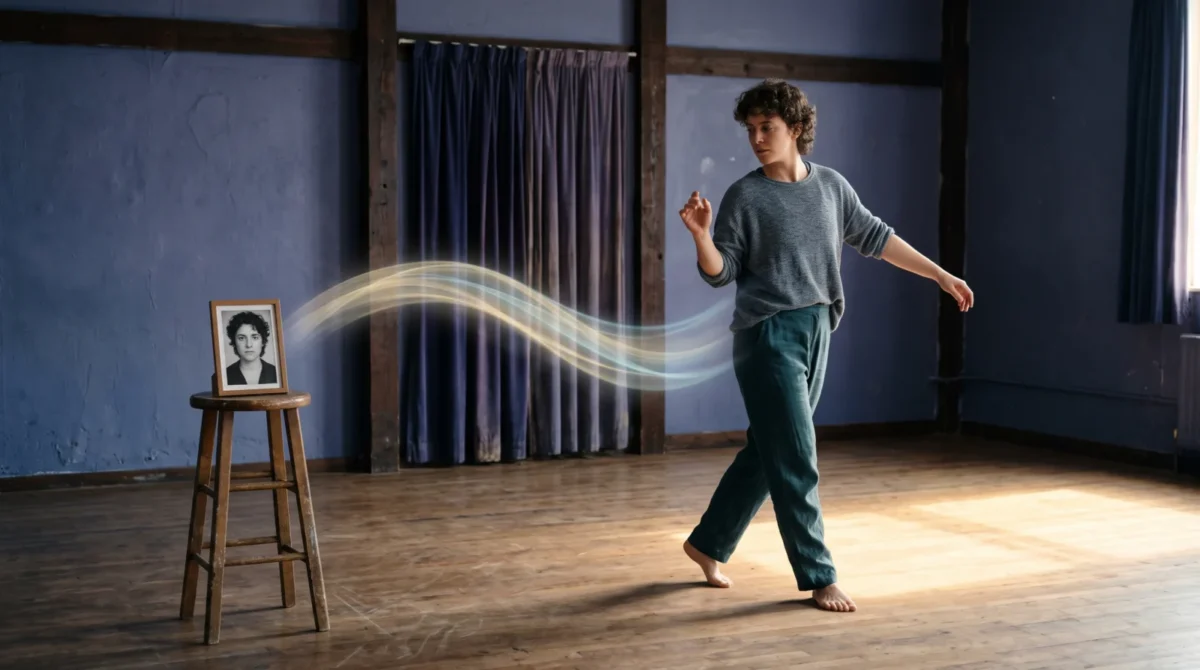
A full-body photo gives OmniHuman 2.0 room to animate more than a face, but the motion prompt should ask for one readable action at a time. BytePlus says its film-grade tier accepts an image and audio with an optional text prompt for body movement; start with a weight shift or short walk. They are directions, not tested recipes.
Start with the shot, not the verb
If the source photo cuts off at the waist, a prompt about walking asks the model to invent a lower body and its contact with the floor. That is a lot. Choose a reference image with the entire subject in view, some open space in the direction of travel and a visible floor. A plain rehearsal room works better as a starting concept than a crowded station where chairs and passersby compete with the subject.
BytePlus describes OmniHuman 2.0 as a single-image-plus-audio generator with an optional text prompt. Its product page explicitly mentions camera and body movement on the film-grade tier, and says text prompts can direct specific actions. That supports asking for a movement; it does not promise that a particular footstep will land exactly where you specify. Treat your prompt as shot direction rather than motion capture.
Keep the voice track in mind while you stage the image. A person delivering a slow introduction can shift stance and look toward the viewer. Sprinting across the frame while explaining an insurance form is another story. For face-first setup advice, see the reference image guide; for where the image and audio enter the workflow, use the step-by-step guide.
Five body movement prompts to adapt
Each block below is a suggested text prompt, not a report of a generated result. Replace the setting and action to match your actual image. Don’t paste all five into one request.
A quiet stance change, for a spoken introduction
A full-body medium-wide shot. The speaker faces the viewer, shifts weight gently from one foot to the other during a pause in the speech, then settles into a relaxed standing pose. Keep the camera still and the floor visible.
This puts the change where a pause gives it room. If the reference is a formal portrait, avoid asking for a sudden athletic pivot. The useful variable here is the weight shift, not a new background.
A short approach, for a welcome line
In a simple studio, the speaker takes two measured steps toward the camera while talking, then stops with both feet planted. Keep the person fully in frame and use a steady camera position.
The stop matters. Without one, a clip can spend its whole duration describing travel instead of giving the viewer a stable talking shot. Leave space in the photo around the shoes. If it isn’t there, use the stance-change version instead.
A turn toward an object, for a demonstration
The speaker stands beside a plain table, turns the shoulders toward the object during the demonstration line, then faces the viewer again. One restrained reach toward the tabletop; no camera move.
This asks for a relation between body and set. BytePlus says prompts can add objects that aren’t in the reference image, but for a product demo I’d rather put the real object in the source photo. Otherwise the model must invent both the object and the hand’s contact with it. If you need the object to matter, read the prop prompt examples.
A side step, for giving the frame breathing room
The speaker steps left. They pause, then turn the upper body toward the viewer. Keep the whole body in view; the camera remains locked off.
Good for a composition that needs empty space next to the subject. Left and right can be ambiguous when described from the character’s viewpoint, so specify screen direction if your editor needs it. Preview the clip before placing graphics in that space; don’t assume the generated position is frame-accurate.
A seated delivery, for a calmer close
The speaker sits in the visible chair, leans forward slightly during the final sentence and then rests back. Keep both hands relaxed and visible. No zoom or cut.
Only use this with a chair already in the reference and enough of the seated pose visible to make the action plausible. A standing source photo with no chair is a harder scene change. For more options on camera direction and restrained gestures, the camera and gesture prompt guide goes deeper.
Match motion to the audio’s shape
BytePlus says the model uses a voice track’s rhythm and meaning to drive movement and expression. That makes the waveform a practical planning tool: listen for a pause before writing a turn, and give a stressed word one small gesture instead of filling every second with movement. A dense instruction such as “walk, wave, spin, sit” gives competing cues during a short sentence.
Write a single dominant action, a start position and a clear end position. Then decide whether the camera stays still. If you need a tracking shot too, add it on a later attempt instead of changing both at once. This is an editorial method for making the prompt easier to diagnose, not a BytePlus rule or a performance guarantee.
Keep dialogue from becoming a prompt dump. The audio carries the words. The optional text prompt describes what you want to see. If a line says “look over here,” put the movement near that line in your plan, but don’t pretend a text instruction can force frame-perfect timing. A human editor can trim the beginning or end if the performance needs tighter pacing.
Budget for one useful iteration
BytePlus lists the film-grade tier at $0.07 per second and a 30-to-300-second output range. A 30-second generation is 30 s × $0.07 = $2.10 on that tier; two versions of the same 30-second scene are 2 × $2.10 = $4.20, before any other costs. The avatar tier is listed at $0.12 per second, but the page doesn’t state the same 30-second minimum for that tier. Don’t apply the film-grade minimum to it by assumption.
For a moving full-body scene, I’d spend the first paid attempt on a locked camera and one short action. If it needs work, change only the action or the source frame. Buying five variations of a vague prompt is a poor way to find out that the shoes were cropped out of the photo. The pricing guide covers the tier math; you can make a video from a photo and audio on the independent overview site.
Before paying for another take, look at the first frame and last frame separately. Is there space for the step? Does the chair exist? Can you actually see both feet at the moment the subject is supposed to stop? Fix the source image or simplify the action before adding a more detailed prompt.