OmniHuman2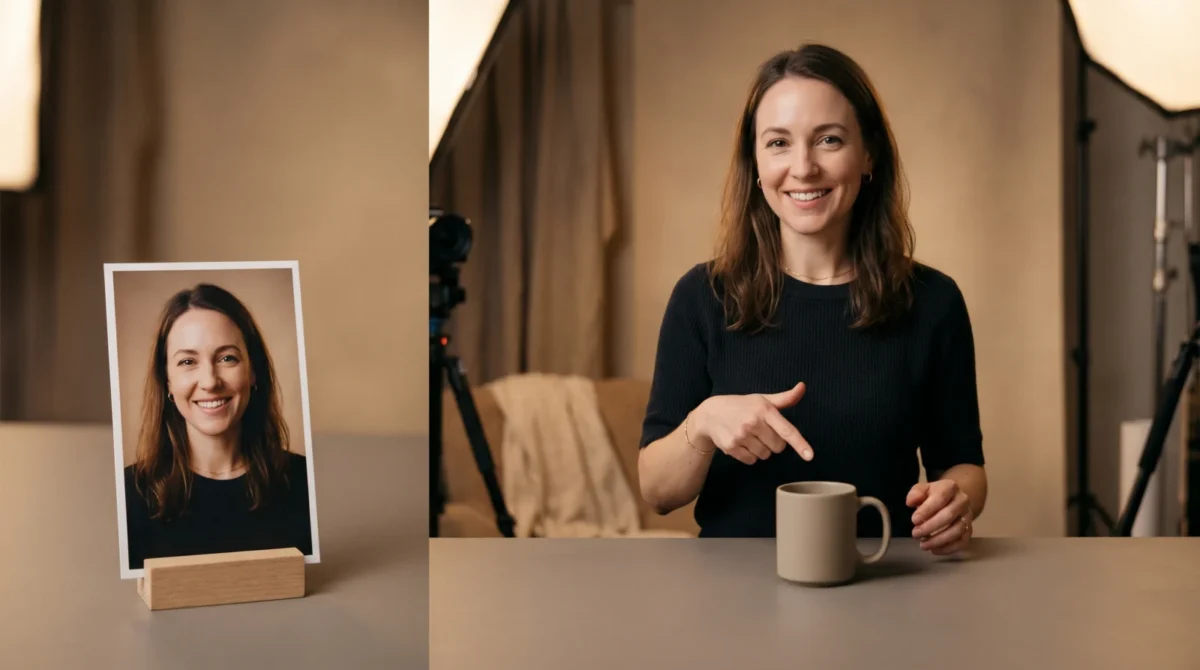
A product demo video with OmniHuman 2.0 works best as a presenter shot: give it one clear portrait, a recorded product script, and a restrained prompt for the speaker’s movement. BytePlus lists e-commerce among its use cases, but you’ll still need real product footage or stills for close-ups and proof of what the item actually does.
Decide what the presenter can honestly show
Take a ceramic travel mug. A useful demo has two kinds of evidence: someone explaining why the lid is easy to open, and a close shot that actually shows the lid opening. OmniHuman can handle the first job. Don’t treat generated hand movement as evidence for the second. If the mechanism matters, film the mechanism or use a verified product still in the edit.
BytePlus describes OmniHuman 2.0 as generating video from a single image and audio, with an optional text prompt. It also lists camera and body movement for its film-grade tier. That combination makes a talking presenter plausible for a product page. Still, you own every claim about materials or performance; no animated face can check the factory spec sheet. A generated speaker can’t verify that a mug stays hot for a stated number of hours. Nor should it try.
I would write the demonstration around a single buyer objection, not a catalog of features. For the mug, that might be whether the lid can be opened with one hand. Put the claim in the voiceover only if it’s true, then cut to actual product footage. A short presenter segment should tell the viewer what to look for in the next shot.
Build a reference frame that leaves room for the edit
Use a licensed image of the intended presenter, with their face visible and their shoulders separated from the background. If the source photo already shows a product in hand, zoom in on the grip and the shape of the item. Inspect the packaging separately. If either is muddy, choose a simpler photo. Otherwise, leave the product out of the portrait. It’s easier to cut to an honest close-up than to ask a video model to preserve tiny label text through a moving hand.
A chest-up composition gives you space for natural gestures without asking the frame to invent a whole set of arms. Leave a little space to one side if you plan to add a real product image later. Keep the mouth unobstructed, skip reflective eyewear if you can, and avoid a pose where a sleeve crosses the face. These are production choices, not guaranteed model rules. For more on framing, see the reference image guide.
Don’t put prices or legal disclosures in the source portrait and hope they stay legible in motion. Add approved text during editing, where you can inspect it at the final display size. The same goes for the product’s logo. A presenter scene is not a substitute for a clean pack shot. Show the item plainly.
Record the script, then give motion one job
Write the voice track before choosing camera movement. A 45-second outline might use 8 seconds to name the problem, 15 seconds for the presenter to explain the design, 12 seconds for real detail shots, and 10 seconds for the buying decision or caveat. Those timings are an editorial plan, not a BytePlus requirement. Record the words at a steady pace and leave short pauses where the close-ups will go.
For a straightforward presenter shot, start with a prompt such as:
The presenter faces the camera in a quiet studio. They give one small open-hand gesture when introducing the mug, then hold a steady posture. Keep the camera at eye level with a gentle, slow push-in. Do not add writing or alter the product.
BytePlus says text prompts can steer actions and camera movement, and can add objects absent from the source image. That second capability is exactly why I’d keep the product instruction conservative: you don’t want a generated lid or handle to become your only product evidence. If the prompt asks for a complicated pour, a turntable spin and a camera orbit at once, you lose a clean way to diagnose what went wrong. Change one instruction per attempt. Keep notes.
For speech-led shots, compare the mouth at the start and end of long phrases, then listen at normal playback speed rather than judging a still frame. Check whether pauses in the recording line up with the moment you want to insert the real product footage. Our lip-sync guide covers the audio-side checks in more detail.
Budget the full cut, not just the voiceover
BytePlus currently lists the film-grade tier at $0.07 per second and describes its output range as 30 to 300 seconds. A 45-second generated presenter segment costs 45 s × $0.07 = $3.15 at that listed rate, before any other production expenses. Its listed 30-second minimum means a 15-second standalone presenter clip is not a sensible film-grade budget assumption. Read the pricing breakdown before mapping a batch of short product listings.
BytePlus also lists an avatar tier at $0.12 per second, described as a realistic avatar from one image and audio with a lip-sync focus. At the listed rate, a 45-second segment would be 45 s × $0.12 = $5.40 if that duration is available in your access path; the product page doesn’t give this tier the same explicit 30-to-300-second range. Don’t carry the film-grade length rule over to the avatar tier without checking the current API requirements. A second generation of the film-grade 45-second segment adds another $3.15 at the listed rate. Revisions cost money. Quickly.
That math excludes your recording, actual close-up footage and editing time. If you have ten products, don’t make ten identical 45-second scripts just because the unit price looks small. Reuse the structure of the shoot, then give each item its own evidence shot and a specific buyer question. If you want to try a presenter frame, make a video on the OmniHuman2.net overview; this site is an independent guide, not the vendor’s console.
Inspect the claims in the finished video
Watch the exported cut with the sound off. Does the item shown in the close-up match the item being described? Is a generated hand pointing to a feature that isn’t there? Check the price against the current listing after editing. Do the same for each button label and product specification. Then listen with headphones for a word lost under a cut. Both passes matter. Especially the silent one.
BytePlus’s product page lists native 720p output. Plan the crop around that source rather than promising a sharp zoom into packaging print. It does not spell out commercial-use terms or regional availability on that page; check the terms for your actual account before putting a synthetic presenter in paid product ads. For the page itself, keep real pack shots accessible beside the video. A buyer should be able to examine the item without having to trust a moving avatar.